HOME » Page 11

Blog

  • Why is Audio / Speech Annotation Services needed for NLP?

    Why is Audio / Speech Annotation Services needed for NLP?

    Audio/Speech annotation services are crucial for NLP (Natural Language Processing) because they bridge the gap between spoken language and the world of machines. Here’s why they are essential:

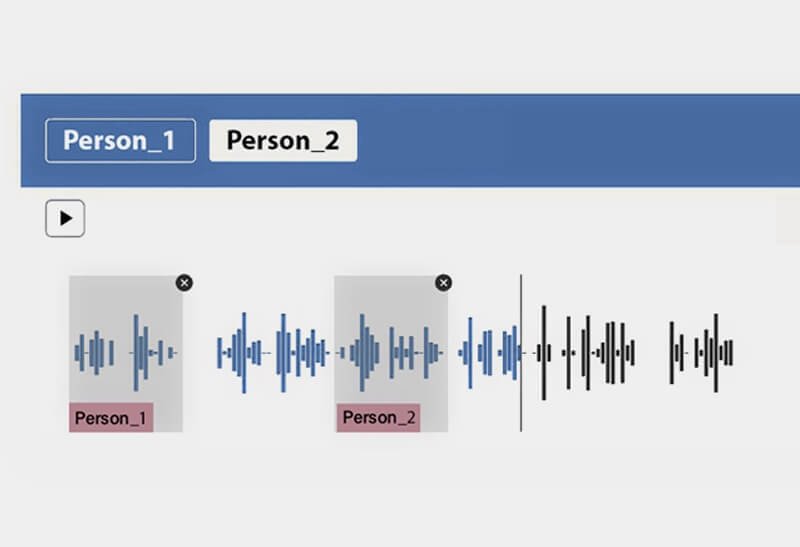
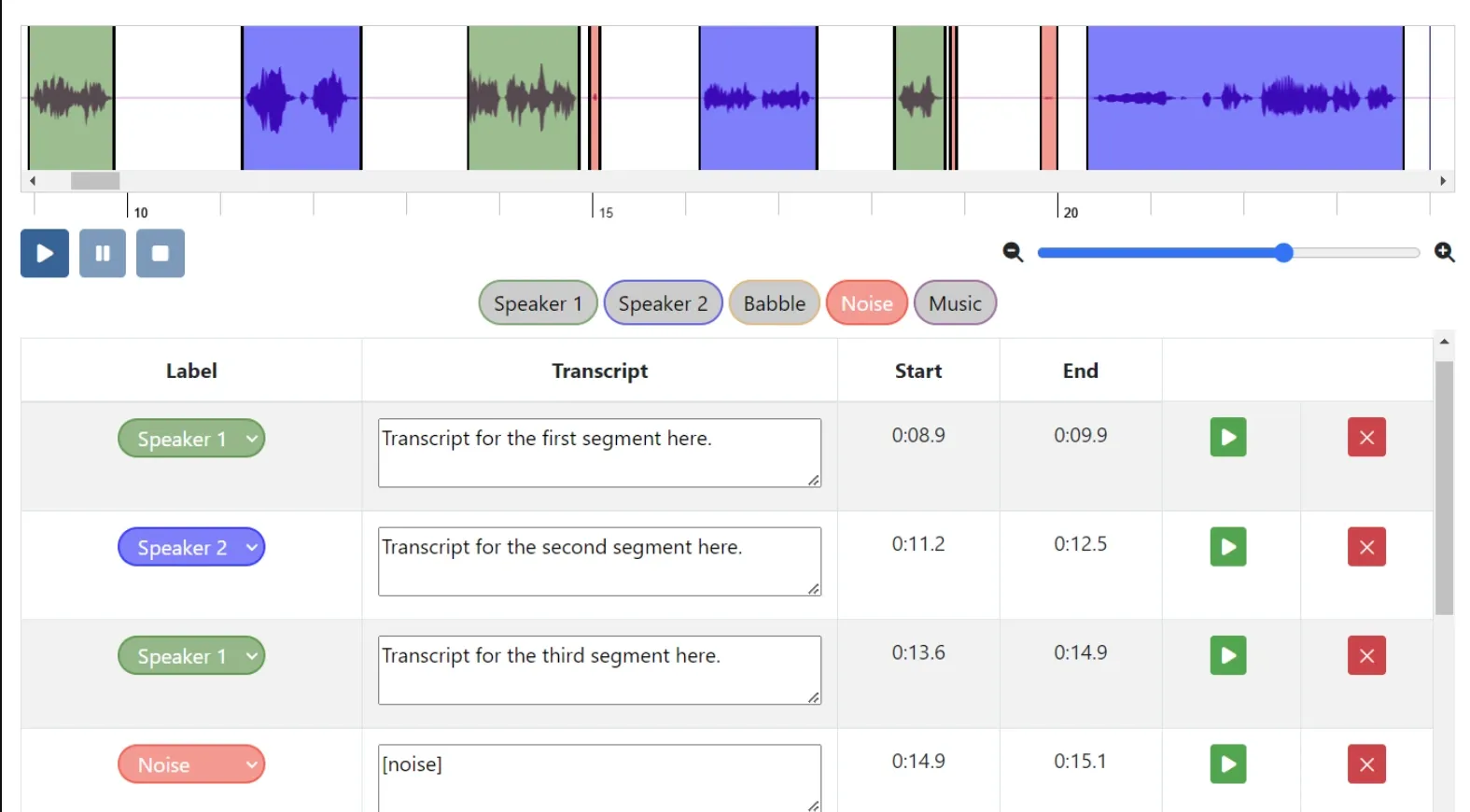
    • Machine Learning for Speech Recognition: NLP relies on machine learning models to understand and process human language. These models require vast amounts of labeled speech data to learn and improve their accuracy in recognizing spoken words. Audio annotation services provide this labeled data by segmenting and tagging speech with relevant information.
    • Understanding Nuances of Speech: Spoken language goes beyond just words. Speech annotation captures additional details like tone, emotion, background noise, and even speaker characteristics. This nuanced data allows NLP models to understand the full context of a conversation, leading to more accurate and natural interactions with machines (like virtual assistants or chatbots).
    • Training for Different Accents and Dialects: Human speech varies greatly depending on accents and dialects. Audio annotation services can provide data that reflects this variety, enabling NLP models to handle diverse speech patterns and improve their overall comprehension.
    • Beyond Just Words: Speech annotation isn’t limited to spoken words. It can also encompass labeling sounds from the environment (traffic noise, music) or even non-verbal cues like laughter or coughing. This enriched data allows NLP applications to be more versatile and understand the broader soundscape of human communication.

    In essence, audio/speech annotation services provide the “training wheels” for NLP models when it comes to speech recognition. By providing high-quality labeled data, they enable NLP to bridge the gap between the spoken word and the digital world.

  • How does Google Gemini work?

    How does Google Gemini work?

    Gemini is the AI-powered assistant from Google, built right into Gmail, Docs, Sheets and more, with enterprise-grade security and privacy.

    Gemini gives you direct access to Google AI. Get help with writing, planning, learning and more.

    How Gemini works

    The simple answer

    When you enter a prompt into Gemini, it replies with a response using the information that it already knows or fetches from other sources, such as other Google services.

    The technical answer

    Gemini gives you access to large language models

    • The language models learn by ‘reading’ trillions of words that help them pick up on patterns that make up language. This allows them to pick up on and reply to your questions using common language patterns
    • They are always learning, which means that they also learn from your prompts, responses and feedback
    • Gemini will make mistakes and might even say something offensive

    Ways to use Gemini

    Here are some prompt examples that you can try out:

    • ‘Explain projectile motion using everyday examples’
    • ‘Which came first: the chicken or the egg?’
    • ‘Help me brainstorm a title for my short story’

    Gemini isn’t human

    It doesn’t have its own thoughts or feelings, even though it might sound like a human. Remember:

    • Gemini can’t replace important people in your life, such as family, friends, teachers or doctors
    • Gemini can’t do your work for you
    • Gemini can’t make important life decisions for you

    Want to know more?

    Get to know the tech behind Gemini through this essential reading list

  • What is Audio Annotation and Segmentation audit?

    What is Audio Annotation and Segmentation audit?

    An audio annotation and segmentation audit is a process of checking the accuracy and consistency of labels and separations made in audio data. It’s essentially a quality control step for data that’s been prepared for machine learning applications.

    Here’s a breakdown of the two parts:

    • Audio Annotation: This involves attaching labels or descriptions to specific parts of the audio. These labels can describe various aspects, like:
      • Speech content (words or phrases spoken)
      • Speaker identification (who is talking)
      • Emotions conveyed in the speech
      • Background noises (traffic, music, etc.)
      • Sound events (doorbell ringing, coughing, etc.)
    • Segmentation: This refers to dividing the audio file into smaller sections based on the annotations. Each segment is then associated with the corresponding label.

    An audit ensures that the annotations and segmentations are:

    • Accurate: The labels correctly reflect the content of the corresponding audio segment.
    • Consistent: Annotators applied the labels and segmentations following the same guidelines throughout the entire dataset.
    • Complete: All relevant aspects of the audio are labeled and segmented according to the project’s requirements.

    By catching inconsistencies and errors, the audit helps improve the quality of the training data for machine learning models. This can lead to better performance and accuracy in applications like speech recognition, speaker identification, and sentiment analysis.

  • Data Annotation vs Data Labeling: Which is Right for You?

    Data Annotation vs Data Labeling: Which is Right for You?

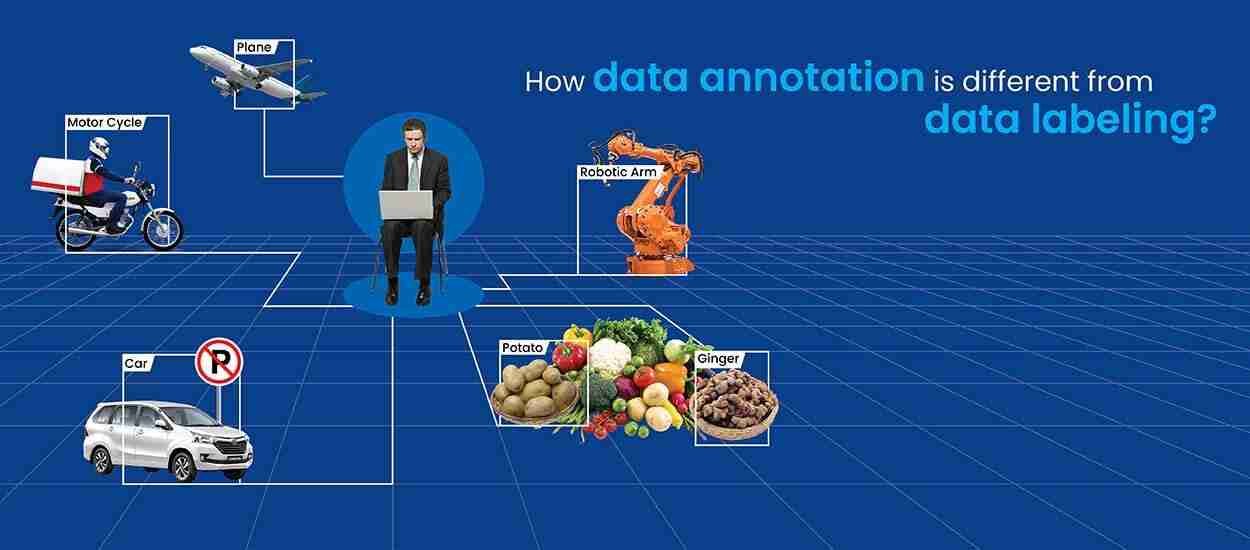
    Data annotation and data labeling, though often used interchangeably, are distinct processes that serve different purposes in training machine learning models. Here’s a breakdown to help you choose the right approach for your project:

    Data Labeling

    • Focus: Categorization and organization.
    • Process: Assigning labels to data points, like classifying an image as “cat” or a text document as “spam.”
    • Use Cases: Well-suited for tasks with predefined categories, like sentiment analysis (positive, negative, neutral) or image classification (car, dog, flower).
    • Complexity: Generally less complex, requiring identification of key features for categorization.
    • Scalability: More scalable for large datasets due to its simpler nature.

    Data Annotation

    • Focus: Adding depth and context.
    • Process: Involves detailed marking or tagging specific elements within the data. This could be drawing bounding boxes around objects in an image, segmenting different regions, or pinpointing keypoints in an image.
    • Use Cases: Essential for complex projects requiring nuanced understanding, such as object detection (identifying and locating objects within an image) or image segmentation (labeling every pixel in an image).
    • Complexity: More intricate and requires a deeper understanding of the data and the task at hand. Annotators often need to make judgments and provide context-rich annotations.
    • Scalability: Can be time-consuming for large datasets due to the level of detail involved.

    Choosing the Right Approach

    • Project Complexity: For straightforward classification tasks, data labeling might suffice. For projects demanding in-depth analysis, data annotation is crucial.
    • Data Type and Volume: The type and amount of data you’re working with also play a role. Large datasets with diverse data types (images, text, audio) might require a combination of both labeling and annotation for optimal model training.

    Ultimately, the best approach depends on your specific project requirements. By understanding the distinction between data annotation and data labeling, you can make an informed decision to ensure your machine learning model is trained on high-quality data.

  • Focusing on small wins

    Focusing on small wins

    Focusing on small wins can have a surprising number of benefits, both big and small. Here are some of the key advantages:

    Overall, focusing on small wins can create a positive feedback loop that fuels motivation, builds confidence, and helps you achieve your bigger goals. It’s a simple but powerful strategy for success.

  • The Essence of Data Annotation

    The Essence of Data Annotation

    The essence of data annotation boils down to teaching machines to see what we see. It’s the process of adding labels or instructions to raw data, transforming it into a format machines can understand and learn from.

    Imagine a child learning shapes. You wouldn’t just show them a pile of blocks and say “recognize the shapes.” You’d point out a circle, a square, a triangle, and so on. Data annotation is like that, but for machine learning algorithms.

    Here’s why data annotation is crucial:

    • Machine learning relies on patterns: Algorithms need labeled data to identify patterns and relationships within the information.
    • Unlocks the meaning: Raw data is meaningless to a machine. Annotation provides context, like labels on a map, allowing the machine to interpret what it’s seeing.
    • Training ground for AI: Annotated data becomes the training ground for AI models. The more data they process, the better they learn to perform specific tasks.

    Data annotation can involve various techniques depending on the data type:

    • Images and videos: Annotators might draw bounding boxes around objects, classify scenes, or track movement.
    • Text: This could involve sentiment analysis (positive, negative, neutral emotions) or identifying topics and keywords.
    • Speech: Annotators might transcribe speech to text or label the speaker’s intent and emotions.

    In essence, data annotation bridges the gap between the human world and the machine world. It’s the groundwork that allows AI to become intelligent and perform tasks that were once thought to be exclusively human.

  • A guide on how to choose the right text annotation service

    A guide on how to choose the right text annotation service

    1. Define Your Needs:

    • Type of Annotation: What kind of text annotation do you require? This could be sentiment analysis, entity recognition, intent recognition, text classification, or a combination.
    • Data Volume: How much text data do you need annotated? This will impact the service’s pricing and turnaround time.
    • Data Complexity: Is your text data straightforward or complex? Complex data (e.g., legal documents, medical records) might require specialized annotators.
    • Desired Accuracy: How important is the accuracy of the annotations for your project? Higher accuracy may come at a higher cost.

    2. Evaluate Service Providers:

    • Expertise: Does the service provider have experience with your specific type of text annotation and data?
    • Quality Control: How does the service ensure the accuracy and consistency of annotations? Look for established quality control processes.
    • Scalability: Can the service handle your data volume efficiently, especially if you have ongoing annotation needs?
    • Security: Does the service provider have robust security measures to protect your sensitive data? Look for certifications or compliance with relevant data security standards.

    3. Consider Additional Factors:

    • Pricing: Get quotes from different service providers and compare their pricing models. Consider factors like cost per unit, minimum project fees, and discounts for larger volumes.
    • Turnaround Time: How quickly do you need the annotated data returned? Some services offer expedited options at an additional cost.
    • Communication & Support: Does the service provider offer clear communication channels and responsive customer support?
    • User Interface and Tools: If using a self-service platform, is the interface user-friendly and do they offer the annotation tools you need?

    4. Shortlist and Test:

    • Based on your evaluation, shortlist a few promising service providers.
    • Consider requesting a free trial or pilot project to assess the quality of their work and compatibility with your needs.

    Here are some additional tips:

    • Read customer reviews and industry reports.
    • Ask for case studies or references to see their experience with similar projects.
    • Don’t be afraid to negotiate for better pricing or turnaround times.

    By following these steps and carefully considering your needs, you can choose the right text annotation service that delivers high-quality data, meets your budget, and helps you achieve your AI goals.

  • Email Is Now the Best Social Network

    Email Is Now the Best Social Network

    Facebook, X, and Instagram are full of viral crap. Email lets me actually talk to my friends.

    Author: Justin Pot Source: https://lifehacker.com/author/justinpot

    It is reposted here with full credit to the author.

    The words “social network” imply that such tools will connect you with the people in your life. That’s not how these services work anymore.

    FULL ARTICLE AT: https://lifehacker.com/tech/email-is-the-best-social-network-now

  • UI [User Interface] in an informative website

    UI [User Interface] in an informative website

    A well-designed UI (User Interface) is crucial for informative websites. It should prioritize clarity and functionality to ensure users can find and understand the information they seek easily. Here are some key UI aspects for informative websites:

    Clarity and Simplicity:

    • Clean Layout: Uncluttered design with ample white space allows elements to breathe and guides the user’s eye.
    • Easy Navigation: A clear and consistent navigation bar should be present at the top or on the side, allowing users to jump to different sections effortlessly. Consider a search bar for in-depth exploration.
    • Intuitive Hierarchy: Use headings, subheadings, and bullet points to structure information logically.

    Focus on Content:

    • High-Quality Text: Use clear, concise, and well-formatted text with proper font size and color contrast for readability.
    • Visuals: Strategic use of images, infographics, and videos can enhance understanding and break up text-heavy sections.
    • Multimedia Integration: For complex topics, consider incorporating interactive elements like timelines, quizzes, or glossaries.

    Accessibility:

    • Responsiveness: The website should adapt seamlessly to different screen sizes (desktop, mobile, tablet) for optimal viewing across devices.
    • Color Contrast: Ensure adequate color contrast between text and background for visual impairments.
    • Keyboard Navigation: The website should be navigable using just a keyboard for users who rely on assistive technologies.

    Additional Considerations:

    • Consistent Branding: Maintain a consistent visual identity (colors, fonts, logos) throughout the website to build trust and recognition.
    • Minimal Distractions: Avoid unnecessary animations, pop-ups, or autoplay features that can pull focus from the content.
    • Feedback and Engagement: Include subtle animations or hover effects on buttons and links to provide user feedback. Consider comment sections or forums to encourage user engagement.

    By following these UI principles, informative websites can create a user-friendly experience that effectively delivers the intended knowledge.

  • What is Local Citation?

    What is Local Citation?

    In the world of local search engine optimization (SEO), a local citation refers to any online mention of your business’s key information, specifically the NAP (Name, Address, Phone number).

    Here’s a breakdown of why local citations are important:

    • Increased Visibility: Citations help people discover your business online, especially through local searches. The more places your NAP appears consistently, the more likely you are to be found by potential customers in your area.
    • Improved Local SEO Rankings: Search engines like Google consider the presence and accuracy of citations as a factor in ranking local businesses. Having consistent citations across various platforms can boost your ranking in local search results.
    • Enhanced Credibility: Consistent citations across the web establish your business as legitimate and trustworthy. When potential customers see your NAP information in multiple places, it builds confidence in your existence and accuracy of your information.

    Here are the two main types of local citations:

    1. Structured Citations: These are formal listings on business directories and websites like Yelp, Yellow Pages, Google My Business, industry-specific directories, and local chambers of commerce.
    2. Unstructured Citations: These are mentions of your NAP that occur more organically, such as online articles, news mentions, social media profiles (with contact information included), and mentions on blogs or forums.

    Building and maintaining accurate citations is an ongoing process for local SEO. It’s important to regularly check for inconsistencies and update your NAP information across all platforms.